Foreground Stage
In private developmentDesign the screens your story plays on. Foreground Stage by Studio Foreground is a visual editor for the parts of an RPG Maker MZ game that prose can't describe: menus, HUDs, dialogue stages and battle screens. You compose and animate them in the editor. A runtime plugin plays them in the game.
One editor, several workspaces
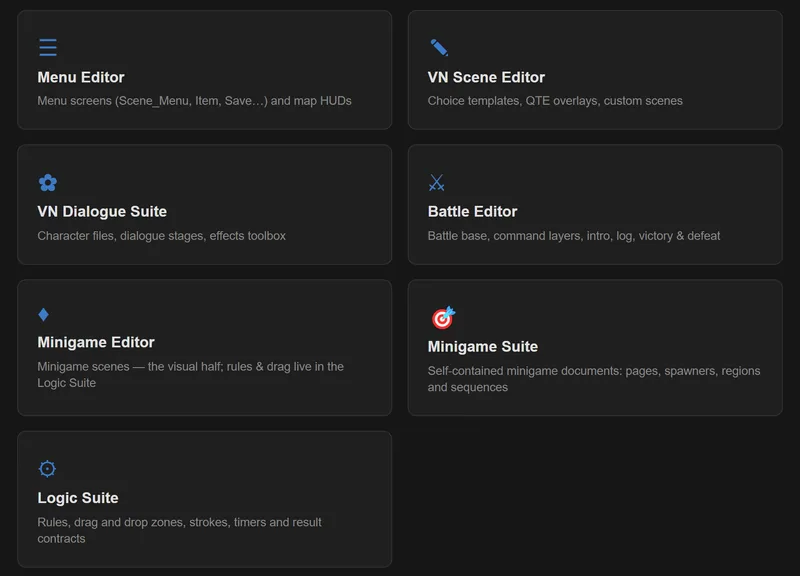
The editor opens on a launcher. Each workspace is set up for one job:
- Menus and HUDs: lay out windows, images and text, and animate how they enter, move and leave
- Visual-novel scenes: character portraits, stage positions and transitions for dialogue-driven scenes
- Battle screens: intro, victory and defeat sequences, the battle log and the command windows
- Minigames: interactive scenes with their own rules (early access, see below)
VN Dialogue Suite
A dedicated workspace for dialogue-driven scenes:
- A character builder for portraits and their expressions
- Stage slots that place characters consistently from scene to scene
- Effects and speech bubbles for emphasis
The game runs the same code as the editor preview, so a scene plays in the game the way it looked when you built it.
Screens that follow the game
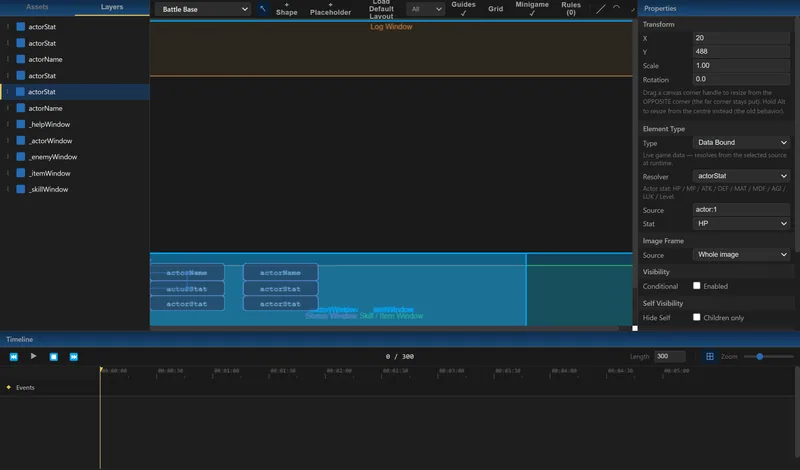
Elements can be static, animated or bound to game data. Gauges and bars follow values such as HP and MP. Elements show or hide based on game conditions. Image slicing lets one sprite sheet supply many interface parts, and the editor can detect the grid of a sprite sheet from its transparent gaps.
Built to drop into your project
Foreground Stage saves your work as data files. Its runtime plugin plays them, and your events trigger them with standard plugin commands. While you work, a developer mode reloads changed files each time a scene opens, so you can adjust and re-check without restarting the game. A skip action lets players jump to the end of an animation.
Companion plugin: EventInterrupt
EventInterrupt lets an event react the moment a game condition changes, for example jumping to a label or running a common event, without wiring checks into every branch. Watchers can fire immediately or wait until the current message closes.
Proprietary software. Minigames with built-in 2D physics (Box2D) work in our test project and are in early access internally. A logic workspace for minigame rules, drag-and-drop, drawn paths and timers is in development with them. See the roadmap.
Interested in Foreground Stage? Contact us.